The best dust collection setup for a router table prioritizes effective top-and-bottom dust capture, easy installation, and compatibility with your existing shop vac or dust collection system. This guide highlights five reliable options, explains who each is best for, and shows how to choose based on your setup. Ideal buyers include hobbyists building small projects, serious woodworkers with larger shops, and professionals who need quick, clean work surfaces with minimal cleanup.
| Product | Best For | Key Benefit |
|---|---|---|
| Milescraft 1501 Dust Router | All-purpose router table users | Complete dust collection with flexible mounting |
| O’SKOOL Dust Collection Box | DIY/router table projects | Impressive containment with easy access |
| POWERTEC 70288 Dust Port | Router table fence connections | Quick, right-angle connection to 2-1/2″ hose |
| POWERTEC 70152 Dust Port | Versatile fence or DIY tables | Wide-flange mounting for flexibility |
| Rockler Dust Bucket with Dual Port | Dual-port, bigger jobs | Dual ports for top and bottom collection |
Milescraft 1501 Dust Router – Complete System
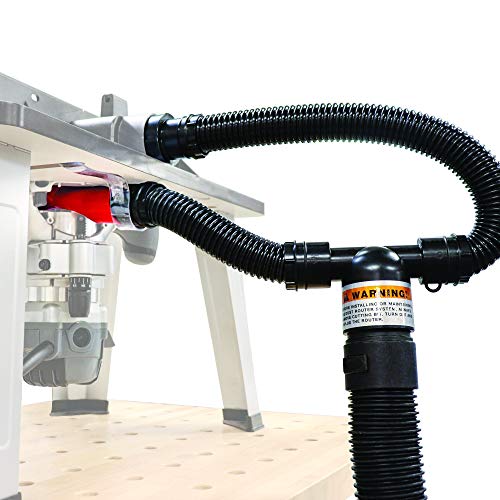
The Milescraft 1501 provides a complete dust collection setup that can attach to most router tables. It supports use with or without a fence and connects to a vacuum source via the dust port and dust cup. This option is best for users who want a ready-to-install system that integrates into a semi-permanent router table arrangement. Choose this if you prioritize a comprehensive, easy-to-attach solution for consistent dust removal.
Best for: hobbyists and small shops needing a straightforward, install-and-use system. Limitation: installation may be less flexible for non-standard router tables without adapters.
O’SKOOL Dust Collection Box with Router Table Kit
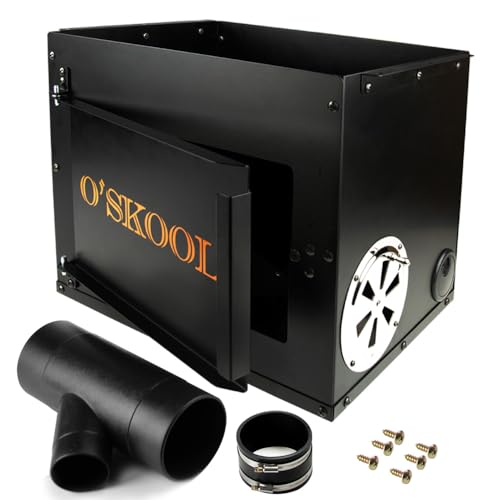
The O’SKOOL kit emphasizes a robust dust box with an accessory set designed to collect debris from both above and below the router table. It includes a magnetic catch door for easy router access and magnetic components for quick changes. This option is best for DIY setups that need excellent dust containment and convenient serviceability. Choose this if you want a focused bottom and top dust capture with simple door access.
Best for: DIY and light-to-moderate workloads. Caution: ensure compatibility with your router table footprint and venting needs, as the kit’s size can be a constraint in tighter spaces.
POWERTEC 70288 Router Table Dust Port

The POWERTEC 70288 is a dedicated dust port designed to connect a router table fence to a 2-1/2″ hose, facilitating quick workstation cleanup. Its right-angle design helps with easy mounting to router tables, fences, or shapers. Best for users who want fast, reliable connections to Shop Vac or dust extraction systems while keeping the table surface clear. Consider this if you want a simple, efficient hose connection at the fence line.
Best for: users prioritizing quick hose-to-fence connections. Caution: it relies on compatible hose diameter and may require additional adapters for non-standard systems.
POWERTEC 70152 Router Table Dust Port

The POWERTEC 70152 offers a 2.5″ ID dust port with wide-flange mounting, enabling compatibility with various fence and DIY router table setups. It’s suitable for collecting dust directly from the drill area or from the fence attachment. This port is best for shop owners who want versatile mounting options and easy integration with fences or custom tables. Choose this if you need broad compatibility across table configurations.
Best for: adaptable router table environments. Limitation: some fences may require additional fittings for optimal seal and airflow.
POWERTEC 70488 Dust Collector Fittings Kit

This kit includes Y fittings, hoses, reducers, and other essential fittings to build a robust router-table dust collection network. It emphasizes an airtight seal, compatibility with fixed router bases, and high dust capture — up to 85%. Best for users who want a scalable system that can grow with a workshop and accommodate multiple connections. Choose this if you need a flexible, high-capacity ducting setup.
Best for: serious installations that require strong containment. Caution: not compatible with lift-router tables, which may limit certain hardware configurations.
Rockler Router Table Dust Bucket with Dual Port

The Rockler Dust Bucket provides a dual-port design, enabling dust collection from both above and below the router table. It features an easy-access door with a magnetic catch, anti-vibration features, and a secure venting system. This option is best for users who want maximum dust capture with a straightforward, quick-access bucket. Opt for this if your project requires robust, dual-port collection and simple maintenance.
Best for: dual-port, high-volume dust control. Limitation: bulkier footprint may require more space on larger router tables.
Buying Guide: Choosing the Right Router Table Dust Collection System
What should you connect to your dust system?
Decide whether you need a fence-connected port, a table-top box, or a bucket-style collection. Fence-connected ports offer quick hose attachment for frequent material removal, while a bucket or box provides broader containment, especially for shops with larger debris output.
What hose size and seals matter?
Most systems use 2-1/2″ hose fittings. Ensure compatibility with your Shop Vac or dust collector and check for airtight seals to minimize leaks and maximize suction.
How important is dual-side collection?
Dual-port dust collectors capture debris from both the top and bottom of the router table, reducing buildup under the table and on the work surface. This is especially valuable for plunge routers or heavy-cut operations.
What about installation and space?
Consider whether you want a nearly permanent setup or a temporary solution. Some boxes or buckets are easy to relocate, while fence-mounted ports require more space planning around the fence and fence hardware.
Budget vs. scalability
Starter kits provide quick wins and low upfront cost, but modular fittings and ports allow you to expand the system as your workshop grows. Plan for future additions if you anticipate expanding routing work.
Compatibility with router tables
Check if the kit supports lift tables, fixed bases, and your specific fence design. Some products are not compatible with lift-router tables, which can affect upgrade choices.
What is the best choice for your setup?
For a balanced setup, consider a complete system like Milescraft for a ready-to-use package, complemented by a versatile PORT system such as POWERTEC 70152 or 70288 for flexible fence connections. If you need maximum dust control with easy access, the Rockler dual-port bucket is a strong option.
Quick comparison at a glance
- Best for all-in-one ease: Milescraft 1501
- Best for DIY with easy access: O’SKOOL Dust Box
- Best fence connection: POWERTEC 70288
- Best versatile mounting: POWERTEC 70152
- Best dual-port containment: Rockler Dust Bucket
Frequently Asked Questions
- What size hose is standard for router table dust collection? Answer: Most setups use 2-1/2 inches in diameter for compatibility with common shop vacs and dust collectors.
- Do I need a dust bucket or a fence-mounted port? Answer: If you want frequent top and bottom dust capture with easy access, a bucket or box is ideal; for quick hose connections at the fence, a port is better.
- Can I mix components from different brands? Answer: Yes, provided the hose diameters and fittings are compatible, and you ensure airtight seals for optimal performance.
- Is dual-port dust collection necessary? Answer: It is beneficial when you work with thick stock or heavy routing, as it improves overall containment and reduces buildup under the table.
- Are these systems compatible with lift router tables? Answer: Some products are not compatible with lift tables; verify compatibility before purchase if you use a lift-router setup.
- What is the best practice for maintenance? Answer: Regularly inspect seals, clean dust paths, and replace worn hoses or connectors to maintain suction efficiency.