Answering the purchase question: a digital table saw gauge helps ensure blade, fence, and arbor alignment with high precision, reducing errors and waste. This guide highlights top options for different users, from hobbyists to pros. The best picks balance accuracy, compatibility with standard miter slots, and straightforward use. This overview targets buyers who want fast, reliable alignment verification across table saws, band saws, and drill presses.
Quick comparison of the five selected products:
| Product | Groove Fit | Measurement Range | Indicator Resolution | Best For |
|---|---|---|---|---|
| Neoteck Digital Dial Indicator (Black) | 3/4″ or more | 0 – 1 inch | 0.0005 inch / 0.01 mm | Precision alignment on common table saws |
| Klein Tools 935DAG | Not fixed to groove | 0 – 90° / 0 – 180° | Not specified in data | Angle and level measurements with magnetic base |
| Neoteck Digital Dial Indicator (Silver) | 3/4″ or more | 0 – 1 inch | 0.0005 inch / 0.01 mm | Same high-precision utility in a lighter shade |
| BOBOVAV Table Saw Alignment Gauge | 3/4″ slots | 0 – 0.0005″ resolution | 0.0005″ (0.01 mm) | Tight tolerance and stable aluminum bar |
| ALLmeter Digital Table Saw Gauge (0.01mm) | 3/4″ slots | 0 – 1 inch | 0.01 mm / 0.0005 in | Fast setup with straight-through design |
Neoteck 0-1” Digital Dial Indicator (Black)

Best for professional shop environments that require consistent, high-precision alignment across table saw components. This gauge follows standard miter grooves (3/8″ x 3/4″) and provides a 0 – 1 inch range with 0.0005 inch (0.01 mm) resolution. It features a zero setting function and inch/mm switchability for versatile use in calibration tasks like blade-to-slot squareness and fence alignment.
Who it’s best for: workshop owners who want a durable, repeatable digital readout to verify saw blade parallelism, fence alignment, and arbor run-out. It is especially suitable for users who work with multiple machines that share 3/4″ groove slots.
Caution: ensure groove width is 3/4″ (19 mm) or wider; exact fit may require screw adjustment for slots wider than 3/4″.
Klein Tools 935DAG Digital Angle Gauge

Best for users needing quick angle and level checks with a robust magnetic base. This tool measures 0 – 90 and 0 – 180 degree ranges and offers a high-visibility display that rotates automatically for easy viewing in awkward positions. The magnetic base allows hands-free attachment to ferromagnetic surfaces like saw blades or metal fences, improving workflow efficiency during setup and calibration.
Who it’s best for: woodworkers and fabricators who frequently verify precise angles in setup tasks and want a flexible digital level alongside a traditional measurement experience.
Limitation: the data provided does not specify its groove-slot compatibility, so use it primarily as an angle gauge rather than a slot-mounted table saw gauge.
Neoteck 0-1” Digital Dial Indicator (Silver)

Best for projects requiring a second, visually similar high-precision gauge in a lighter color option. It shares the same 0 – 1 inch range and 0.0005 inch resolution as the black version, with CNC-machined aluminum bars and six holes for the indicator, enabling precise adjustments across various workshop machines.
Who it’s best for: shops that want a matching pair of gauges for redundancy or multi-machine calibration without sacrificing precision or durability.
Caution: ensure groove compatibility remains at standard 3/4″ slots; if grooves are wider, install with the provided screws to ensure a snug fit.
BOBOVAV Table Saw Alignment Gauge

Best for users who want a CNC-machined aluminum structure with tight tolerances and a 0.0005″ resolution. It fits standard 3/4″ (19 mm) slots and accommodates wider slots with screw adjustments. The design emphasizes stability and minimal wobble, improving measurement reliability for blade parallelism, arbor run-out, and fence alignment.
Who it’s best for: professionals needing a compact, rigid gauge that can tolerate extended use in a busy workshop with various saws and machines.
Limitation: wider slots may require screw-based width adjustments to achieve a secure fit, which can add setup time.
ALLmeter Digital Table Saw Gauge (0-1 Inch)
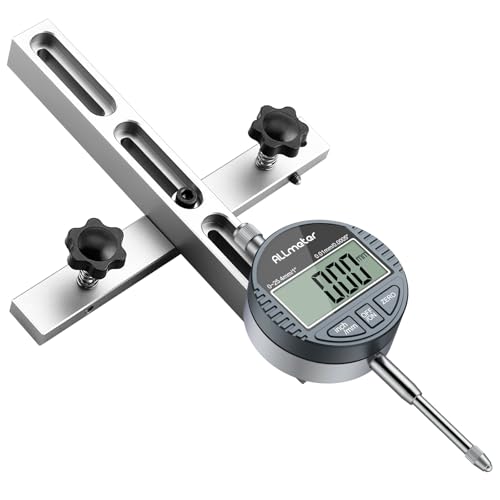
Best for rapid setup with a straight-through chute design. This gauge uses a 0.01 mm (0.0005 inch) dial indicator on a CNC-machined aluminum bar and is designed for standard 3/4″ miter slots. The extended 18 cm rod offers stability for longer measurements, making it suitable for multiple alignment tasks on fences, blades, and arbors.
Who it’s best for: woodshops needing fast, repeatable alignments with minimal repositioning during calibration sequences.
Limitation: ensure compatibility with slot width beyond 3/4″ via adjustable screws if needed for a snug fit.
Buying Guide: Key Considerations for a Digital Table Saw Gauge
- Slot compatibility: Most gauges target 3/4″ (19 mm) miter grooves. Confirm your saw’s groove width and whether adjustable width is required.
- Measurement range and resolution: Look for a 0 – 1″ (0 – 25.4 mm) range with 0.0005″ (0.01 mm) resolution for precise alignment tasks.
- Indicator type: Digital dial indicators provide easy readouts and zero-setting; ensure an inch/mm switch is available if you work with both units.
- Bar construction: CNC-machined aluminum bars with multiple chutes improve stability and allow precise placement across several machines.
- Mounting and setup: A straight-through chute design or a tight-fitting screw-adjustment system helps minimize wobble and setup time.
- Best use cases: Decide if you primarily need blade-to-slot alignment, fence alignment, or arbor run-out measurements, and choose accordingly.
FAQ
- What is the typical groove width these gauges fit?
- Why choose a digital indicator over a traditional dial gauge?
- Is a magnetic base necessary?
- Can these gauges be used on non-table-saw machines?
- Do all gauges require frequent recalibration?
Most gauges in this guide are designed for standard 3/4″ (19 mm) slots, with some adjustable options for wider or narrow slots.
Digital indicators provide higher resolution, quicker readings, zero-setting, and easier unit switching, improving speed and accuracy during setup.
Magnetic bases help with hands-free operation on ferromagnetic surfaces, improving convenience during angle measurements and alignment tasks.
Yes, many gauges are compatible with other shop machinery like band saws, drill presses, and router tables as long as the groove or mounting method is suitable.
While digital indicators reduce drift, regular checks against a known reference (even simple shims or blocks) are recommended for critical setups.